
David Owasi
Article
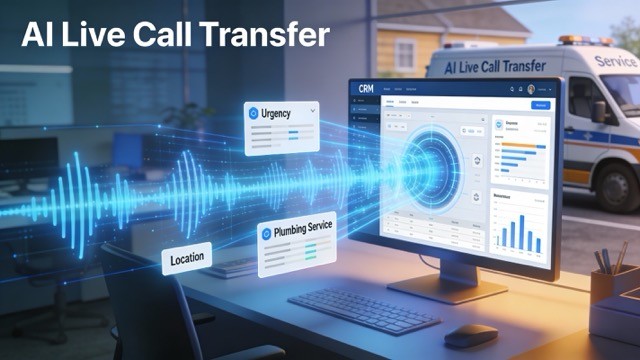
AI live call transfer is an automated way to answer incoming calls, understand caller intent with natural language, and route or hand the call off in real time to the right person or workflow. By combining real-time IVR, intent detection, and low-latency audio handoffs, AI call routing reduces friction, captures lead details, and preserves conversation context for downstream systems like CRMs. This guide walks through how live call transfer integration works, why it recovers lost revenue for home services, and how to implement and measure a successful rollout. You’ll learn how AI interception and qualification change routing rules, which system requirements and configuration steps make transfers reliable, the vendor features to evaluate, and the KPIs and dashboards that prove ROI. Throughout, we use terms like live call transfer integration, call routing API, and AI receptionist integration so the telephony and field-service details stay clear.
How Does AI Live Call Transfer Improve Your System’s Call Routing?
AI live call transfer improves routing by answering calls immediately, detecting intent, and transferring the caller — with contextual metadata — to the right dispatcher or specialist. Because the AI captures service type, urgency, and location before handoff, routing ambiguity drops and you can prioritize queues and make real-time decisions. The practical effects are fewer missed connections and faster time-to-dispatch, which boost first-call resolution and lead conversion. Real-time webhooks and CTI events let the CRM receive a structured lead record the moment a call is answered, enabling immediate scheduling and follow-up. Understanding these routing mechanics helps you design the operational and technical checks needed for integration.
These routing and qualification improvements create clear business value for field services; the next section breaks down those benefits and the metrics to track.
What Are the Benefits of Automated Call Routing for Home Services?

eAutomated call routing for home services cuts missed calls, shortens hold times, and lifts conversion from inquiry to booked job by capturing intent and contact details up front. For plumbing, HVAC, electrical, and restoration work — where callers often need urgent help — AI can surface urgency and escalate transfers to on-call technicians or trigger immediate callbacks with higher SLA priority. Intent detection followed by prioritized transfer reduces dead leads by ensuring every inbound call is answered or captured as a qualified lead for follow-up. Typical outcomes include higher answered-call rates, faster time-to-booking, and more efficient dispatchers — all of which translate into recovered revenue from calls that might otherwise be lost.
To quantify benefits, track answered-call uplift and conversion changes, then apply revenue-per-call estimates; the next section explains how AI enriches CRM records to support that measurement.
How Does AI Receptionist Integration Enhance CRM Efficiency?
An AI receptionist integration improves CRM efficiency by creating structured lead records, auto-populating fields, and attaching call metadata and transcripts to each lead for faster dispatch decisions. The integration uses webhooks and API calls to create or update records in platforms like ServiceTitan, Housecall Pro, or Jobber, mapping fields such as name, phone, service type, address, urgency, and notes. That reduces manual data entry and prevents lost details when calls move between agents or during outages, improving lead hygiene and reporting. Dispatchers get cleaner queues, technicians get better job context, and marketing can attribute revenue to specific call outcomes for ongoing optimization.
Validate and map critical CRM fields before rollout to avoid mismatches that cause dropped leads or duplicates.
Think about the cost of missed calls — sometimes thousands per day — and how AI can plug those revenue leaks by answering every call. When the AI answers, it converts previously unhandled calls into qualified leads and warm transfers, preserving the business value of each inquiry. As an AI receptionist or voice agent, the system captures intent, populates CRM fields in real time, and hands off warm transfers to dispatchers or human agents when needed. That technical bridge requires provisioning SIP/VoIP compatibility, webhook endpoints, and CRM API permissions before you enable live call transfer flows.
What Are the Best Practices for Integrating Live Call Transfers into Your Existing System?
Successful AI live call transfer integration starts with a pre-integration audit, staged rollouts with solid fallbacks, and secured APIs and network paths for telephony traffic. Verify SIP trunking, firewall rules, and webhook endpoints while mapping CRM fields and permission scopes. Best practices minimize downtime and make transfers resilient, with voicemail and callback fallback logic. Run staged testing with shadow deployments and detailed monitoring to avoid large-scale disruption and to tune routing rules before full cutover. These controls help ensure your call routing API behaves predictably under peak load and that handoffs are traceable.
Use a structured checklist to validate prerequisites and configuration steps before you route live traffic through the AI system.
Pre-integration audit: Confirm telephony, SIP trunks, and CRM API access.
Staged rollout plan: Deploy in pilot regions or during off-peak hours.
Fallback strategy: Conp voicemail, callback, and overflow queues.
Following this checklist lowers integration risk and gives you a repeatable path to production; the table below maps requirements, configurations, and verification steps.
Intro to integration checklist table: The following table maps system requirements to required configuration actions and verification steps to ensure a robust integration.
System Requirement | Required Configuration | Verification Step |
|---|---|---|
SIP/VoIP compatibility | Provision SIP trunk, test codec negotiation | Perform end-to-end SIP call tests and record logs |
API/webhook support | Create authenticated webhook endpoints and API keys | Send test payloads and verify CRM lead creation |
CRM permissions | Grant create/update lead scopes and field-level access | Validate field mapping with sample calls |
Network/firewall rules | Open ports for SIP and RTP, prioritize QoS | Run simulated stress tests and monitor packet loss |
Logging & monitoring | Enable call recording and transfer logs | Generate transfer success/failure reports for 24 hours |
This checklist gives clear remediation steps and verification methods; following it reduces surprises at go-live and speeds rollback if needed.
Which System Requirements Support Smooth AI Call Transfer Integration?
Smooth AI call transfer integration depends on telephony infrastructure that supports SIP/RTP, low-latency audio paths, and a CRM that accepts webhook-driven leads. The setup relies on stable SIP trunking, correct NAT traversal, and QoS prioritization for voice packets to avoid latency during handoffs. CRM API access with authenticated keys and mapped fields is required so the AI can create leads and update call outcomes in real time. Network security items include firewall rules for webhook IP ranges, TLS for API calls, and data policies for call recordings and PII. Preparing these elements ahead of time shortens troubleshooting during testing and speeds a staged rollout.
Verify each item with small-scale test calls to confirm handoffs and metadata sync before you move to full production traffic.
How to Conp Automated Call Routing for Optimal Performance?
Conp automated call routing by defining intent-based rules, priority queues, and graceful fallback flows that protect the caller experience. The AI should classify intent (service type, urgency) and map that to routing actions like live transfer to a dispatcher, scheduled callback, or ticket creation. Implement SLA controls — maximum ring time, transfer timeout, and escalation thresholds — so handoffs either succeed or fall back without dropping the lead. Add logging and alerting on transfer failures for fast remediation, and tune thresholds after launch to improve transfer success rates. Regular monitoring and iterative adjustments align routing with business goals and dispatcher capacity.
Document routing decision trees and add a verification step for each rule to reduce ambiguous transfers and improve first-call resolution.
How Can AI Lead Qualification Improve Call Handling and Conversion Rates?
AI lead qualification scores and categorizes callers in real time so you can prioritize high-value or urgent requests for immediate transfer. Natural language understanding captures service type, urgency, and availability, producing a lead score that queues transfers to the right resource. That targeted routing boosts conversion because high-propensity calls reach humans without delay while lower-priority inquiries get scheduled callbacks or self-service. The net result: fewer dead leads and more efficient dispatching, with AI serving as both receptionist and enrichment layer. The next sections explain how continuous answering and concise qualification scripts drive these results.
Below is a quick list of how lead qualification affects operations and revenue.
Faster Prioritization: High-value calls are flagged and transferred immediately to reduce time-to-book.
Cleaner Handoffs: Enriched lead data cuts follow-up time for dispatchers.
Reduced Dead Leads: Immediate qualification turns unattended calls into actionable opportunities.
These outcomes require continuous coverage and well-designed scripts that collect the minimum essential information before transfer.
What Role Does AI Play in Preventing Missed Calls for Home Services?
AI prevents missed calls by offering continuous answering and overflow strategies that capture caller intent 24/7, including outside normal business hours. After-hours or overflow calls can be routed into qualified leads or warm-transferred to on-call staff so urgent repair requests don’t become dead leads. Before-and-after comparisons often show meaningful revenue recovery because calls that used to go to voicemail now convert into scheduled jobs or callbacks. Operationally, AI eases pressure on limited dispatch teams during peak windows and provides consistent coverage during staff shortages. Proper fallback rules — callbacks and voicemail transcription — preserve lead value when a live transfer isn’t possible.
Make sure routing rules include fallback callbacks and voicemail transcription to keep lead value even when live transfer can’t happen.
How Does AI Lead Qualification Streamline Customer Interaction?
AI lead qualification streamlines interactions by capturing key details — service required, urgency, address, availability — in the first moments of the call and mapping them directly into CRM fields. The system records structured answers and free-text intent, then attaches those attributes to the lead so dispatchers don’t need to repeat questions. This reduces touches, speeds scheduling, and raises customer satisfaction through faster resolution. A short qualification script trims average handle time while preserving enough context for accurate quotes and resource planning. The result: fewer no-shows and higher first-call booking rates.
Design short, prioritized qualification flows so conversations stay efficient while ensuring the CRM captures what dispatch needs.
What Are the Key Features to Look for in AI Live Call Transfer Solutions?
When evaluating AI live call transfer solutions, prioritize real-time transfer capability, low-latency audio handoff, CRM sync with metadata capture, customizable qualification flows, and SLA controls. Look for robust webhook support, call recording, transfer success metrics, and configurable fallback behaviors to avoid dropped transfers. These features directly affect customer experience by cutting hold times, improving first-call resolution, and giving dispatchers the context they need. Vendor APIs should provide clear call routing API integration and support common field-service CRMs via webhooks or CTI connectors. Assess these capabilities to ensure the vendor can deliver measurable improvements in conversion and efficiency.
The checklist below helps buyers compare feature sets and expected business outcomes.
Real-time transfer and low-latency handoff to live agents to preserve call context and reduce drop rate.
CRM sync and metadata tagging so every transfer attaches a structured lead to downstream systems.
Customizable qualification flows and SLA rules that align automated behavior with business priorities.
Intro to feature comparison table: The table below compares critical features (entity), their attributes, and the business value they deliver for home services operations.
Feature | Attribute | Business Value |
|---|---|---|
Real-time transfer | Low-latency audio, RTP optimization | Preserves conversation context and reduces dropped calls |
CRM sync | Webhook/CTI lead creation with metadata | Enables immediate scheduling and attribution |
Qualification flows | Custom NLP scripts & scoring | Prioritizes high-value leads and reduces dispatch time |
SLA controls | Ring time, escalation thresholds | Ensures consistent service levels and fallback behavior |
Call analytics | Transfer success rate, handle time | Drives continuous optimization and staffing decisions |
This comparison highlights the capabilities that most directly influence revenue recovery and operational efficiency; use it to prioritize vendors.
How Do AI Receptionists Integrate with CRM Systems?

AI receptionists integrate with CRMs using webhooks to push structured lead payloads, API calls to create or update records, and CTI connectors for deeper telephony-CRM linkage. Typical payloads include caller name, phone, service type, urgency, address, call transcript URL, and a transfer status flag. Integration patterns range from direct webhook-to-CRM to middleware translation layers or native connectors for platforms like ServiceTitan, Housecall Pro, and Jobber. Common pitfalls are mismatched field names, insufficient permissions, and rate limits that cause dropped or delayed leads. Verifying field mappings and running test payloads before production prevents synchronization errors and duplicates.
A robust integration plan includes retry logic for failed webhook deliveries and consistent error logging to speed troubleshooting.
Which Automated Call Routing Features Enhance Customer Experience?
Routing features that improve customer experience include context-aware routing, ETA/presence detection for technicians, personalized IVR prompts, and dynamic priority queues. Using caller history and intent to route returning customers to familiar queues or specialized agents reduces friction and time-to-resolution. Personalized IVR with NLU lowers perceived wait times and increases first-call resolution by gathering the right data before a human picks up. ETA and presence integration with field-management systems can determine whether to transfer to a nearby technician immediately, improving arrival estimates and customer satisfaction. Each feature reduces customer effort and raises the chance of booking on the initial interaction.
Test these features with sample customer journeys to ensure they deliver real CX improvements rather than adding complexity.
After evaluating features, map vendor capabilities to your priority outcomes — fewer missed calls, higher conversion, and cleaner CRM data — before choosing a partner. Next, we show how to measure success.
How to Measure the Success of Live Call Transfer Integration in Your System?
Measure success by tracking answered calls, missed calls, transfer success rate, lead-to-booking conversion, and revenue per call. Map call events to CRM outcomes and tie those outcomes back to revenue to quantify recovered value from previously missed opportunities. For seven-p home service businesses, even small uplifts in answered-call rates can mean thousands of dollars per day; modeling revenue-per-call against uplift in answered calls gives a concrete ROI estimate. Build dashboards that combine telephony metrics and CRM outcomes, tag calls by routing outcome, and review trends weekly during rollout. A clear measurement framework helps attribute impact and guides iterative optimization.
The following list shows the top metrics to prioritize when evaluating integration success.
Answered Call Rate: Percentage of inbound calls answered by AI or human agents; measured via call logs.
Transfer Success Rate: Percentage of transfers completed without drop; measured via transfer event logs.
Lead-to-Booking Conversion: CRM-tracked conversion from created lead to booked job; measured via CRM outcome fields.
Revenue per Call: Average revenue tied to converted calls; measured via closed-job revenue attribution.
Intro to KPI EAV table: This table maps KPI entities to attributes and recommended measurement methods, with expected impact to help teams prioritize monitoring.
KPI | Measurement Method | Expected Impact |
|---|---|---|
Answered calls | Telephony logs tagged by AI answer vs. missed | Increased capture of inbound demand |
Transfer success rate | Call routing API transfer events | Fewer dropped leads and higher CX |
Lead-to-booking conversion | CRM outcome tracking and campaign attribution | Direct increase in booked jobs |
Revenue per call | Revenue attribution for closed job records | Quantifies recovered daily revenue |
Average handle time | Call duration and disposition analysis | Helps balance qualification depth vs. transfer speed |
This mapping gives a clear path to build dashboards that show both operational health and direct revenue impact from live call transfers.
When modeling lost revenue, use conservative revenue-per-conversion assumptions and scale by recovered calls to estimate daily recovery; that helps justify investment and plan a phased rollout. If you want vendor validation, request a pilot demo with a measurement plan that includes these KPIs.
What Metrics Indicate Effective AI Call Handling?
Effective AI call handling shows up as higher answer rates, strong transfer success rates, improved lead-to-booking conversion, and stable or shorter average handle time. These improvements come from the AI’s ability to pre-qualify callers and attach metadata so humans can follow up faster with fewer repeats. Benchmarks vary by market, so watch trends rather than single numbers and monitor transfer failure spikes or network-related correlations. A KPI dashboard should include time series for each metric and drill-downs to identify problem areas, like specific routing rules or geographies. Monitoring these metrics lets operations tune qualification depth versus speed for the best conversion outcomes.
Set alerts for transfer-success drops and conversion variance so you can troubleshoot quickly and keep improving.
How to Use Customer Feedback to Improve Call Transfer Processes?
Use customer feedback — post-call surveys, NPS, and QA of transcripts — to refine qualification scripts, IVR phrasing, and routing thresholds. Capture feedback tied to call IDs and routing outcomes so you can analyze which flows deliver the best sentiment and conversion. Run regular QA sessions to spot where the AI misinterprets intent or routing choices cause friction. Establish a feedback cadence, for example weekly QA early in rollout and monthly after stabilization, and feed insights back into intent models and routing rules. Combining quantitative metrics with qualitative feedback ensures the system improves both efficiency and experience.
Closing the loop between customer sentiment and routing logic builds trust in automated transfers and boosts downstream booking rates.
What Are Common Challenges When Integrating Live Call Transfers and How to Overcome Them?
Common challenges include call drops during handoff, mismatched CRM field mappings, network latency, and resistance to new workflows. Each issue has a technical or change-management root cause and can be addressed with staged rollouts, explicit field-mapping validation, SIP/RTP QA, and staff training. Implement robust monitoring and set clear alert thresholds for call-failure rates so you catch problems early. Pilot programs and off-peak cutovers reduce disruption and produce early wins that build momentum. Tackling both technical reliability and people processes is essential for sustainable adoption.
A problems-and-solutions approach helps teams create pre-launch tests and contingency plans that minimize production risk and protect revenue.
How to Prevent Technical Issues During AI Call Transfer Setup?
Prevent technical issues by running end-to-end tests that simulate real traffic, validating SIP and RTP flows, and confirming webhook reliability with retries and logging. Use scripted test calls to exercise priority queues, forced transfer timeouts, and fallback flows so behavior matches expectations under stress. Monitor packet loss, jitter, and transfer success metrics and set alerts for thresholds that affect audio quality or cause drops. Maintain a rollback plan and a testing checklist that includes CRM field verification and load-test results. These practices reduce unexpected outages and provide actionable troubleshooting data.
Proactive testing and clear rollback criteria give teams confidence to revert safely if critical failures appear during cutover.
What Strategies Ensure Minimal Disruption to Home Service Operations?
To minimize disruption, run pilots in limited geographies or customer segments, schedule cutovers during off-peak hours, and train dispatchers and field staff on new workflows before live traffic arrives. Use parallel run modes where AI answers in shadow and creates leads without routing live transfers so operations can validate data quality. Define escalation roles during the pilot and provide quick-reference guides for dispatchers handling warm transfers. Communicate changes to staff and set realistic launch timelines to allow iterative tuning. These strategies preserve service continuity while enabling gradual, low-risk adoption of AI-driven routing.
A phased rollout with clear communication and staff enablement reduces friction and increases the chances of a smooth, revenue-positive deployment.
AI Integration in CRM: Readiness, Tools, Opportunities, and Threats
This article examines company readiness to integrate AI into CRM systems, common AI tools used in CRM, and the opportunities and threats of AI-enabled CRM. The research combines literature review and an industry pilot study to answer whether companies are prepared and which tools and trends are shaping AI adoption in customer service.
Artificial Intelligence (AI) in CRM‑possibility of effective integration, opportunities and threats, 2023
Transforming Customer Relationship Platforms with AI for Enhanced Data Processing and Customer Experience
This manuscript explores how AI can evolve Customer Relationship Platforms into smarter, real-time systems. It outlines an architecture that blends ML, NLP, predictive analytics, ETL pipelines, and scalable warehousing to automate segmentation, deliver personalized experiences, and improve data processing for faster decisions.
Automated Lead Qualification Using RPA and Sales Force, TV Rashmi, 2024
Conclusion
Integrating AI live call transfer meaningfully improves call handling — reducing missed calls, speeding dispatch, and increasing lead conversion. For home services and other field-based businesses, those improvements translate directly into recovered revenue and better customer experiences. With the right prerequisites, staged rollout, and measurement plan, AI can become a dependable receptionist and routing layer that strengthens your operations. Ready to see how this works for your team? Talk to a vendor about a pilot that includes the KPIs above.

Help & Support
Frequently asked questions
Our Workflow Engineers study your calls, follow-ups, and CRM to craft brand-ready templates that scale.